

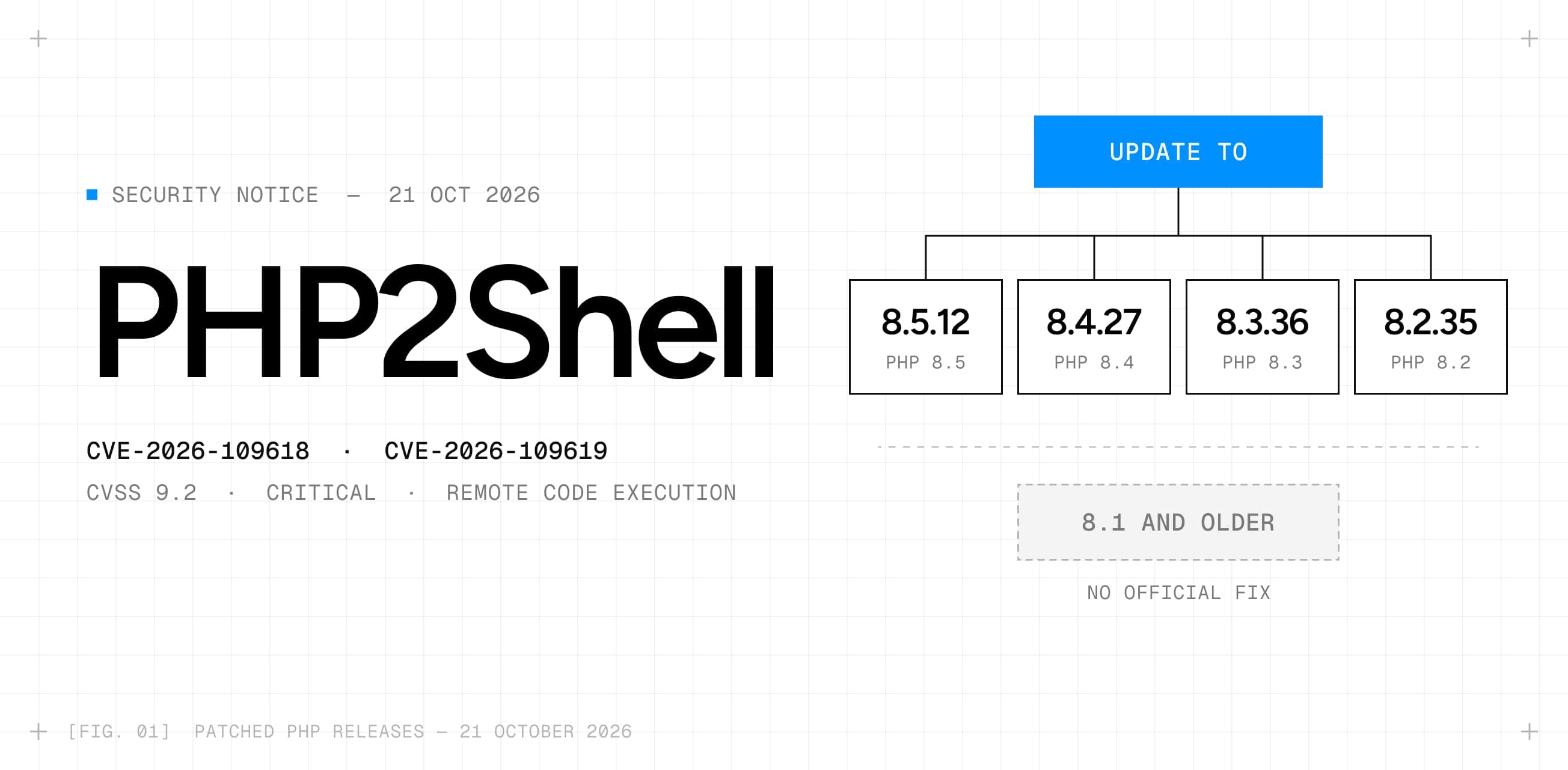
The short answer
If your website runs on PHP, update PHP to 8.5.12, 8.4.27, 8.3.36 or 8.2.35 (or your Linux distribution’s patched package) and restart it. On managed hosting, ask your host whether this has been done. Updating WordPress, plugins or themes does not fix this: the problem is in PHP itself.
What happened
On 20 October, details of two unpatched vulnerabilities in PHP leaked ahead of the planned coordinated disclosure, together with an exploit tool called PHP2Shell. The PHP security team announced an emergency release for Wednesday 21 October at 14:00 UTC.
In the hours before the fix, several organisations took their sites offline as a precaution. In the Netherlands these included Tweakers, the Tweede Kamer and the NCSC, and according to NOS also DigiD and MijnOverheid. Cloudflare said it saw early attacks against PHP sites and rolled out firewall rules. Other security firms reported probing, but no confirmed breaches at that point.
The patched versions went out as scheduled. The official advisories are on php.net and GitHub (see the sources at the end).
What PHP2Shell is and where it goes wrong
PHP2Shell is the name of the leaked exploit, not of a single bug. It covers two separate vulnerabilities in the PHP engine. Both are rated Critical (CVSS v4.0 9.2) and both can lead to remote code execution: an attacker gets the server to run commands of their choosing, with the rights of the web server.
CVE-2026-109618: memory errors during a request
When PHP runs out of memory, it jumps out of whatever it was doing. According to the advisory, this can happen while request data is only partly set up, and the clean-up that follows then treats that broken data as valid. An attacker can trigger the out-of-memory condition with a crafted multipart request (the format forms and file uploads use) that stays under PHP’s upload limit but costs far more memory to process. On Apache with mod_php, the PHP team demonstrated full remote code execution over HTTP with default settings, before any application code runs.
CVE-2026-109619: state left over from a previous request
PHP workers handle many requests in a row. This flaw lets internal state from one request survive after its memory has been freed, so a later request on the same worker can use it before PHP resets it. This is a so-called use-after-free. The advisory confirms two ways to reach it: session upload progress and early configuration (INI) warnings.
In plain terms: the bug is not in your website’s code, theme or plugins. It sits in the layer underneath that all of them run on.
Who is at risk
Any server that uses PHP to serve web pages on a version older than the patched releases. That includes:
- WordPress, WooCommerce, Drupal, Joomla, Magento, Laravel and other PHP applications
- Staging and test sites, old subdomains and forgotten installs
- Hosting control panels and appliances that ship their own PHP, such as cPanel and Plesk
How exposed a server is depends on how PHP runs on it:
| Setup | Exposure |
|---|---|
| Apache with mod_php | Highest risk. Remote code execution demonstrated for both flaws. |
| PHP-FPM (Nginx and most managed hosting) | Exposed. One attack path was confirmed on FPM; for the memory flaw a full exploit wasn’t shown, but the vulnerable code can still be reached. |
| FrankenPHP, LiteSpeed and php-cgi | Named as at risk by the PHP team. |
Sites that don’t run PHP at all, such as sites built with Framer, Astro or Next.js, are not affected by these two flaws.
What to do now
- 01Find out which PHP version your site runs. Your hosting dashboard usually shows it, or ask your host. Developers can run php -v on the server.
- 02Update PHP to 8.5.12, 8.4.27, 8.3.36 or 8.2.35, or install your Linux distribution’s patched package. Distributions and long-term support vendors received the patches in advance.
- 03Restart PHP (PHP-FPM or Apache), so every worker runs the new version.
- 04Check every install, not just the main site: staging, old subdomains, internal tools and anything that ships its own PHP.
- 05On managed hosting, ask your provider when PHP was updated. Hosts patch at server level, so you usually can’t do it yourself.
- 06On PHP 8.1 or older, there is no official fix. Ask your host or vendor about backported patches and plan an upgrade. PHP 8.2 receives security fixes until 31 December 2026.
Can’t update today? Temporary measures
The PHP advisories list a few settings that make the known attack paths harder. They reduce the risk, but they don’t make a server safe, and some of them break uploads or progress bars. Test them first and treat them as a bridge to the update.
- Set session.upload_progress.enabled to 0 and restart all PHP workers.
- On PHP 8.5, also set fatal_error_backtraces to 0.
- Keep post_max_size low (for example 8M if the site doesn’t take large uploads), and block multipart requests at the web server for addresses that don’t accept forms or uploads.
- The advisory also suggests setting memory_limit to -1 on servers that can’t update yet. Only do this together with your host or developer: it removes PHP’s own memory cap.
- Behind Cloudflare, its managed firewall rules block known exploit patterns, but only if your server accepts traffic from Cloudflare alone.
For a high-risk site that can’t be patched quickly, a temporary maintenance page is a reasonable choice. That is what several Dutch organisations did.
How to tell if your site was hit
There are no official indicators of compromise yet. Security firms expect a successful attack to show up as the PHP process starting other programs. Signs to look for:
- PHP or web server processes (php-fpm, php-cgi, apache2, httpd) starting shells, scripts or download tools
- New or changed PHP files in the web root that nobody uploaded, such as webshells
- New cron jobs, scheduled tasks or admin accounts
- Outgoing connections from the web server that you can’t explain
If you suspect a breach, take the server off the internet, keep the web server and PHP logs, and get help before you clean up. Updating PHP closes the hole, but it doesn’t remove anything an attacker already left behind.
Where the real risk sits
Three things make PHP2Shell more serious than a typical plugin bug:
- No login needed. The attack works with an ordinary web request. On mod_php it runs before your application code, so security plugins and CMS settings don’t help.
- Access to the server as the web user. Code runs with the rights of the web server, which can usually read configuration files with database passwords and, through those, customer data.
- Old PHP versions stay open. PHP 8.1 and older no longer get official updates, and many public servers still run them.
Forgotten installs are often the weakest point: an old campaign site, a staging copy or a tool nobody maintains, on the same server as the main site.
Are Visinex sites affected?
No. The sites we build run on Framer, Astro or Next.js. None of them use PHP, so these two vulnerabilities don’t apply to them. Not sure what your own site runs on? Send us a message and we’ll check it with you.
Frequently asked questions
Is WordPress affected by PHP2Shell?
Does updating WordPress or my plugins fix it?
Which PHP versions are safe?
My site runs on PHP 7.4 or 8.1. What now?
Is my site safe behind Cloudflare?
Do I need to take my site offline?
Sources: PHP security releases, advisory CVE-2026-109618, advisory CVE-2026-109619, Sansec, Huntress and Patchstack. Written on 21 October 2026; details may still change.

Chris Nijhof is the founder and creative director of Visinex. He designs brands, websites and product interfaces for founders and growing companies.